article > tech
What Happens When You Type a URL in a Browser Address Bar
The long and short journey of packets
Recently, I’ve been revisiting my computer networking studies, and I’ve been thinking about the classic web developer interview question “Tell me what you know happens when you type a URL in the browser address bar”. When I was asked this question in an interview, I thought it would be good to have some depth, but on the other hand, I thought it would be nice to just know the process of how a browser brings up a web screen, regardless of the depth.
It’s a little spicier than some of the front-end tech interview reads, so you might want to look at it and think, “This is a little spicy. You don’t need to know this much.” I’ll break it down in more detail.
The long and short journey of the packet
I’ve summarized in numerical order how the HTTP request message from the client is sent to the server, the HTTP response message from the server is sent to the client, and then the browser displays the content. I’ve summarized it in a little less detail, so I’ll explain it with relevant references and images.
1. The browser resolves the URL entered in the address bar
When you type an address into the address bar, the browser deciphers the URL to determine the web server, file name, and port number (web servers default to 80) to retrieve from the remote location, and prepares to build a GET request message in the actual HTTP message format.
In the case of the Chrome browser, the UI thread of the browser process, which is the top-level process of the browser application, is said to evaluate the input entered in the address bar. Since the Chrome address bar also acts as a search bar, it also checks whether the string typed in the address bar is a URL or a search term.
2. the browser builds an HTTP GET request message
Based on the information it has interpreted from the URL, it builds a GET request message that can take that resource and has a status line, header, and body that conforms to the HTTP message format.
3. The browser makes a DNS request to the OS and executes it


The Domain Name System (DNS) is a server for resolving domain addresses and IP addresses. Because there are a huge number of servers on the Internet, it’s impossible to register them all on a single DNS server. Domain information is hierarchized by separating domains with . to distribute the information to DNS servers, and when a DNS lookup request comes in, it follows the part of the URL that corresponds to the domain, and multiple DNS servers work together to find out where the information is registered.
The protocol for DNS requests is UDP, and the IP addresses of DNS servers are already known to your OS as part of your computer’s TCP/IP settings. If the web server you’re trying to access is registered in DNS, you get a response with the IP address, which is interpreted by the OS’s DNS resolver, which extracts the IP address, stores it in memory, and makes it accessible to the browser’s process.
Browsers can’t make network requests directly; they rely on the OS to make all network requests, including DNS requests.
4. the browser requests the OS’s protocol stack to send messages and create sockets

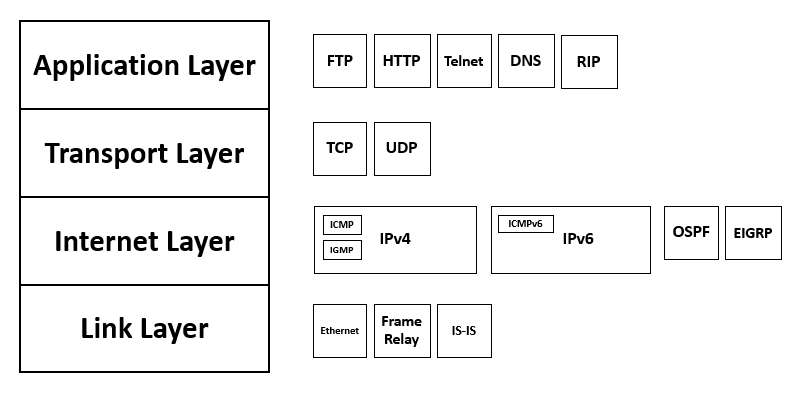
The actual implementation of the protocol stack used for TCP/IP resides at the OS level.
A socket is a collection of control information to control the communication behavior of two devices. It also refers to the area of memory that holds the communication control information. I thought it would be more of a hardware concept, but apparently not.
When a client gets an IP address from a DNS lookup, it can specify which socket on the server-side computer it wants to connect to because the port number specified is specific to a process on the server-side computer.
The two sockets at the end of the communication will read and write data back and forth as a pipe. When a socket is created, the OS will free up an area of memory and identify it with a unique file descriptor.
5. The TCP protocol stack uses a three-way handshake to establish a connection to the server


The TCP protocol uses the Three-Way Handshake handshake to verify that each end is ready to communicate by exchanging SYN and ACK bits. Here’s a simple explanation of the process
- Initially, the connection request process at the sender sends a connection message by setting the SYN bit to 1.
- The server that receives the TCP header looks for a socket corresponding to the port number, records the necessary information, and proceeds with the connection behavior. If the server accepts the request, the receiver also sets the SYN bit to 1 and the ACK to 1 to resend it.
- When the process receives the return header from the server, if SYN is 1, the connection is successful and it writes control information to the socket, such as the server IP address or port number of the socket, indicating that the connection is complete.
- Finally, the client sends back a TCP header with the ACK bit set to 1 to indicate that it received the packet.
If the communication protocol is https, the https (TLS) handshake also follows the TCP handshake.
6. Create a packet in the TCP protocol stack and append the TCP header.
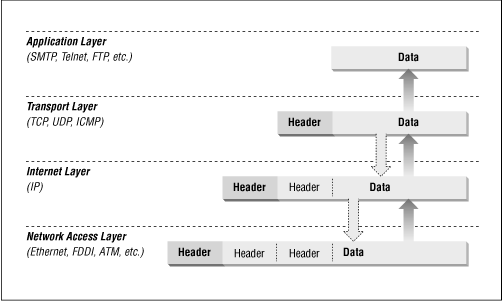
This is the starting point of OSI layer 4, the transport layer.
Once we’ve established a connection via handshake, we take the data we need to send to the server (HTTP message), truncate it to fit the maximum size that can be sent over TCP (MSS), and add control information (TCP headers) to each piece of data, such as which piece is the last piece of data. First, create a packet with the data fragments.
The main information in the TCP header is the port number of the sender and receiver, the data offset (where the data starts), the ACK number, and the 6 control bits (URG, ACK, FIN, SYN, PSH, RST).
7. The IP protocol stack breaks the packet into smaller pieces and appends a MAC header based on the MAC address of the remote location.
The basic units of packets created by TCP are further divided into smaller units based on MTU according to the line and network conditions, and IP headers are attached to the smaller packets. However, in order for a device to communicate, it needs not only an IP address but also a unique MAC address of the device’s network interface (LAN card).
Address Resolution Protocol (ARP) is responsible for determining the MAC address based on the IP address. ARP first sends out a broadcast request within the same network to get the MAC address of the device if the remote server is inside the network, or the MAC address of the network router if it is outside the network. Based on the addresses it finds, it attaches a MAC header to each packet.
The main information in the IP header is the destination IP address, the type of Layer 4 protocol, the sender IP address, a flag (indicating if the packet is fragmented and if it can be broken into fragments), and a fragment offset (indicating how many bytes from the beginning of the message the data portion of this packet is).
8. Turning binary data into electrical signals through a LAN adapter
The LAN adapter turns binary data into electrical signals by adding data such as a preamble bit that the sender uses to time the read of the packet, a bit that tells it where the packet starts, and an FCS bit to detect packet errors.
But as you know, you don’t always need to have a LAN adapter plugged into your computer to use the internet. You can also get the internet over the air using Wifi or cell phone data.
- Using a Wifi router: A router is a device that allows multiple computers to access the internet by sharing one IP address. A router also has a LAN adapter plugged into it. Each device using Wi-Fi sends an electrical signal to the router via wireless local area network, and the signal goes out through the router to the LAN adapter.
- When connecting with smartphone data: It sends an electrical signal to the nearest base station, which is connected to a high-speed wired network.
9. Sends an electrical signal to the MAC address of a remote location.
The electrical signal is transmitted through the LAN cable. The packet is sent to the router of the network if the remote destination is an external network with a different bandwidth, or to the remote destination if it is an internal network with the same bandwidth.
As electrical signals travel within the same network to find a remote server, they encounter a second layer of equipment called a switch. A switch is like a bunch of terminals attached to one another, and together they form a network. A switch checks for packet errors by comparing the FCS at the far end of the packet, and it also checks to see if the terminal attached to it is the destination of the packet by looking at its MAC address table.
Because the switch knows the MAC addresses of all the devices attached to it, it can filter out things like ARP requests, which are broadcast in nature and should theoretically reach all devices.
You’ll often hear the term “N-layer equipment,” which refers to devices that can see control information such as headers all the way to the N-layer, like the behavior described above where packets are headerized by layer. A switch, which is a Layer 2 device, can see the information in the MAC header, a router, which is a Layer 3 device, can see the information in the IP header in addition to the MAC header, and so on. It is the difference in how far you can see the packet.
If the destination of the packet is an external network, the packet arrives at a router in the network.
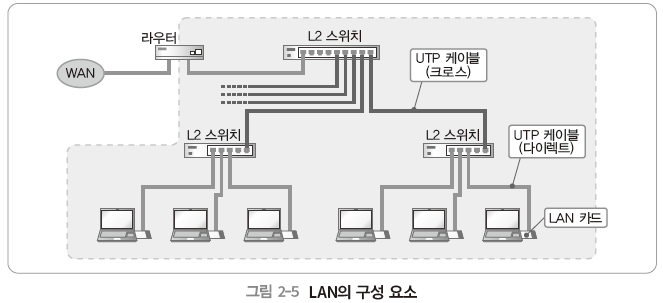
When a packet arrives at a router, it requests an ARP from the remote to find out the MAC address of the remote that exists on another network through the port it is connected to, scours its routing table to find a path to broker the packet, and sends out electrical signals.
A routing table is a table that records information about the destination (IP address, subnet mask, gateway) and the distance to the destination. The router compares the IP address registered in this entry with the destination IP of the packet it receives to find the best route to send the packet. Sometimes the router splits the packet further to accommodate line conditions.
11. access line, which passes through the router to access the Internet and is intermediated to the interior of the Internet.
After leaving the router, the packet travels through the Internet’s access lines, where it is transformed into a form suitable for long-distance communication and additional control information is attached before being relayed internally to the Internet. Depending on the type of access line, the detailed behavior differs depending on the type of access line, and in the case of FTTH access line, the packet is transformed into a form suitable for optical fiber and optical communication.
At this stage, the electrical signals travel through the building’s indoor wiring and into telephone cables on utility poles. From the pole, these electrical signals enter the telecom company’s telephone station, where they are relayed to the internet via a router for internet access.
12. Packet Flow Inside the Internet

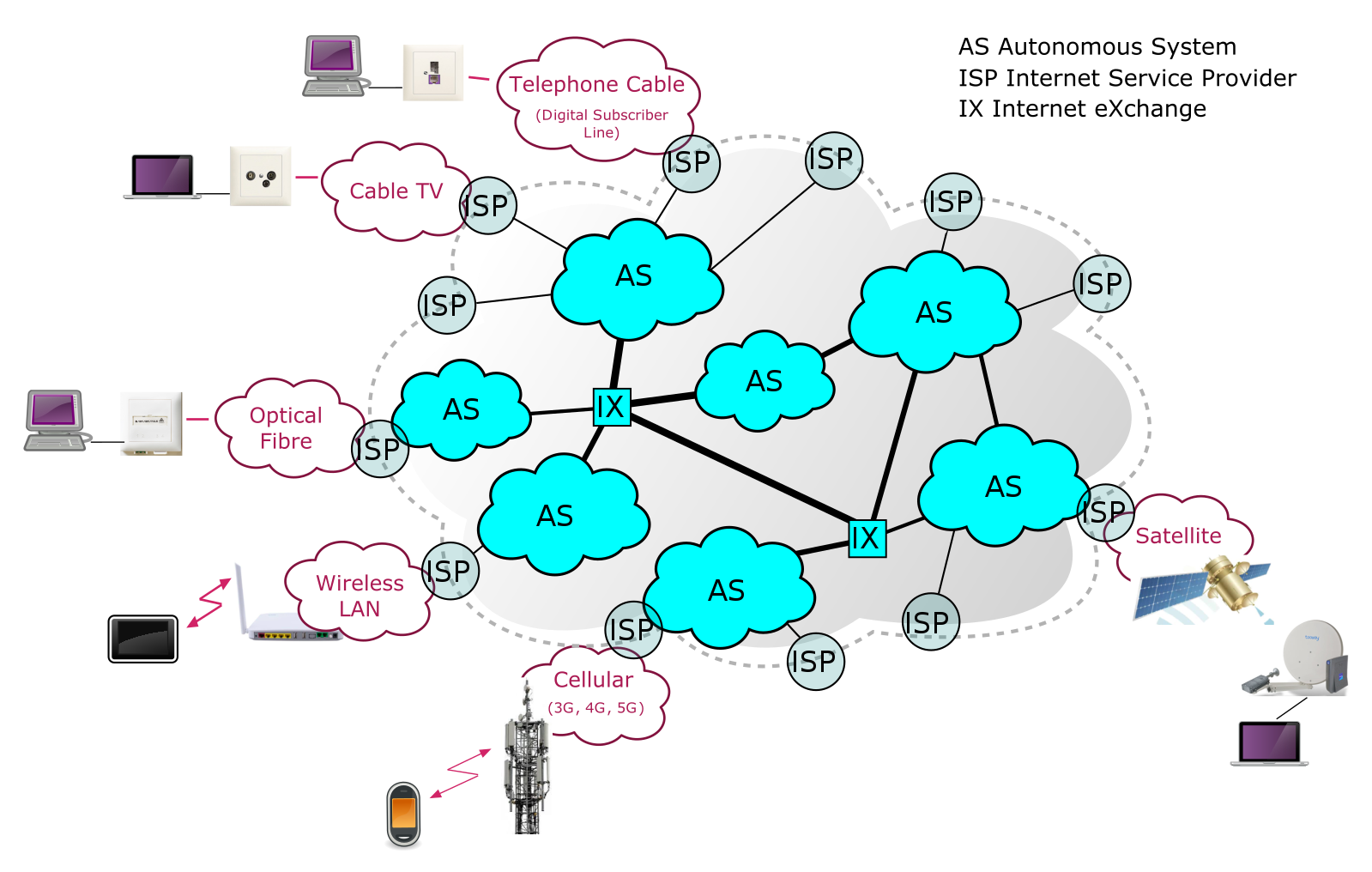
The Internet is not a single network operated by a single organization, but rather a collection of interconnected networks from many providers (internet operators).
Your ADSL or FTTH access line is connected to the facilities of the provider you contract with. When you subscribe to carrier internet, you get a unique IP address and line connected to these carrier facilities. You can easily think of the internet as a myriad of routers from different carriers.
Your packets travel through multiple routing equipment from multiple providers, and finally arrive at a router on the network containing the destination server, and then at the terminal of that destination web server.
While traveling through multiple providers, electrical signals cross oceans on undersea cables and circle the globe more than once (a-d).
13. What happens after the electrical signal arrives at the web server
After receiving the electrical signal, the web server’s LAN adapter turns the electrical signal into binary data. It compares the MAC addresses of the packets received on the network interface, uses FCS to determine if the packets have been tampered with, and if they are correct, sends them up the protocol stack at the operating system end.
The IP part of the protocol stack reassembles the truncated packet based on the IP header, determines if the IP address is correct, and passes it on to the TCP part of the protocol stack. It references the flags and offsets in the packet’s IP header.
Based on the TCP header, the TCP part reassembles the truncated packets into complete data and sends an ACK number back to the client if the packet was received successfully. See Sequence number in TCP header.
Find the appropriate socket that was created when the TCP handshake was made based on the control information and port number.Write the completed data to the socket and pass it to the application’s process.
This is the decapsulation behavior that reassembles the data sent by the client from fragmented packets and header information based on electrical signals as it moves up the network layer.
The server application receives the completed request message and creates a response message.
When the server application receives the http request message, it replaces the request URI with a URI in the actual server’s file system, locates the corresponding html resource, puts it in the body, and creates a response message with response headers. The directories on the endpoint and the web server can be different, so the server needs to locate them correctly.
Just as the client makes a request, the server goes back down the protocol stack to process the packet and send a response message back to the client across the internet and routers.
15. What happens when the client browser receives the response message?
The client’s browser looks at the content-type header of the HTTP message and realizes that the response data is html. Based on this, the browser executes a display behavior. Displaying the screen is the responsibility of the renderer thread of the browser process.
The browser parses the HTML and displays the interpreted HTML on the screen through the Critical Rendering Path, and if it encounters a script or link tag while parsing, it stops rendering and requests resources such as JS, CSS, etc. from the server through the same process described above.
Resources other than HTML are received from the server through the same process as above, and again through the critical rendering path, CSS is applied, JS is interpreted and executed, and the completed web page is displayed on the browser.
16. When the request is finished, disconnect and close the socket using the 4-Way-Handshake.
When we’re done sending and receiving data, we perform a 4-way-handshake to disconnect.
- When the request-response is complete, the server sets a 1 in the FIN bit of the TCP header to indicate to the client that the connection is over. The client receives the FIN bit, realizes that the server is disconnecting the socket, and sends an ACK number back to the server.
- The client then notifies the application that it has received all the data sent by the server and cleans up its data sending and receiving behavior.
- The client-side protocol stack creates a FIN 1 TCP header and sends it to the server, and when the server receives the ACK back, it ends the connection with the server. The socket is then destroyed.
Because of keep-alive, which was introduced in HTTP 1.1, it’s common for the connection to not be closed immediately when the request ends. After the keep-alive timeout expires, the server-client connection is disconnected and the socket expires.
Closing thoughts
This was an intense exploration of the packet’s journey, and while it’s a process-oriented summary, there are a lot of details and concepts that were left out.
I didn’t understand the whole process and the role of all the devices, but I think this is enough to summarize the big picture of network communication that you need to know as a web developer. I think I can answer some interview questions based on this content.
While studying, I came across a website that contains information on undersea cables that are laid all over the world, and it made me feel magnificent.
Just sitting at home, turning on the internet, I have access to all these web apps, and packets are traveling thousands of kilometers across the ocean, and it only takes a few milliseconds. I was like, “How is this possible?” I had a newfound appreciation for the incredible technological prowess of humans. I guess I was a little bit of an engineering geek…lol.